AI Agent Workspace

Youragents
forgeteverything.

Filepad gives AI a persistent workspace — files, memory, and context that survive every conversation, every session, every Monday.

No credit card required · Cancel anytime

01

Your agents start from zero. Every time.

Monday morning. You tell your AI to pick up where it left off. It has no idea where that is. So you paste the brief again. Then the context. Then the instructions. You're doing the briefing, not the work.

02

There's no memory. No files. No continuity.

AI assistants live inside a single conversation. Close the tab and everything disappears. There's no persistent instruction set, no memory of your business, no workspace to come back to.

03

Filepad gives your agents a real workspace.

Instructions, memory, skills, and artifacts all live as versioned files. Your agents open the workspace and already know your business. They pick up where they left off. Every time.

How it works

From files to trusted outputs
in four steps.

01

Structure your workspace

Create a workspace with 8 standard folders — agents, skills, memory, sources, artifacts, and more. Everything lives as real, editable files.

No hidden prompt databases. Every instruction, skill, and memory entry is visible in the file tree.

02

Connect any agent

Issue a scoped HMAC key. Your agent discovers skills as callable prompts, reads sources, and writes outputs — all within the limits you set.

Any agent that supports MCP or the Agent Access API connects in minutes. No vendor lock-in.

03

Review before it lands

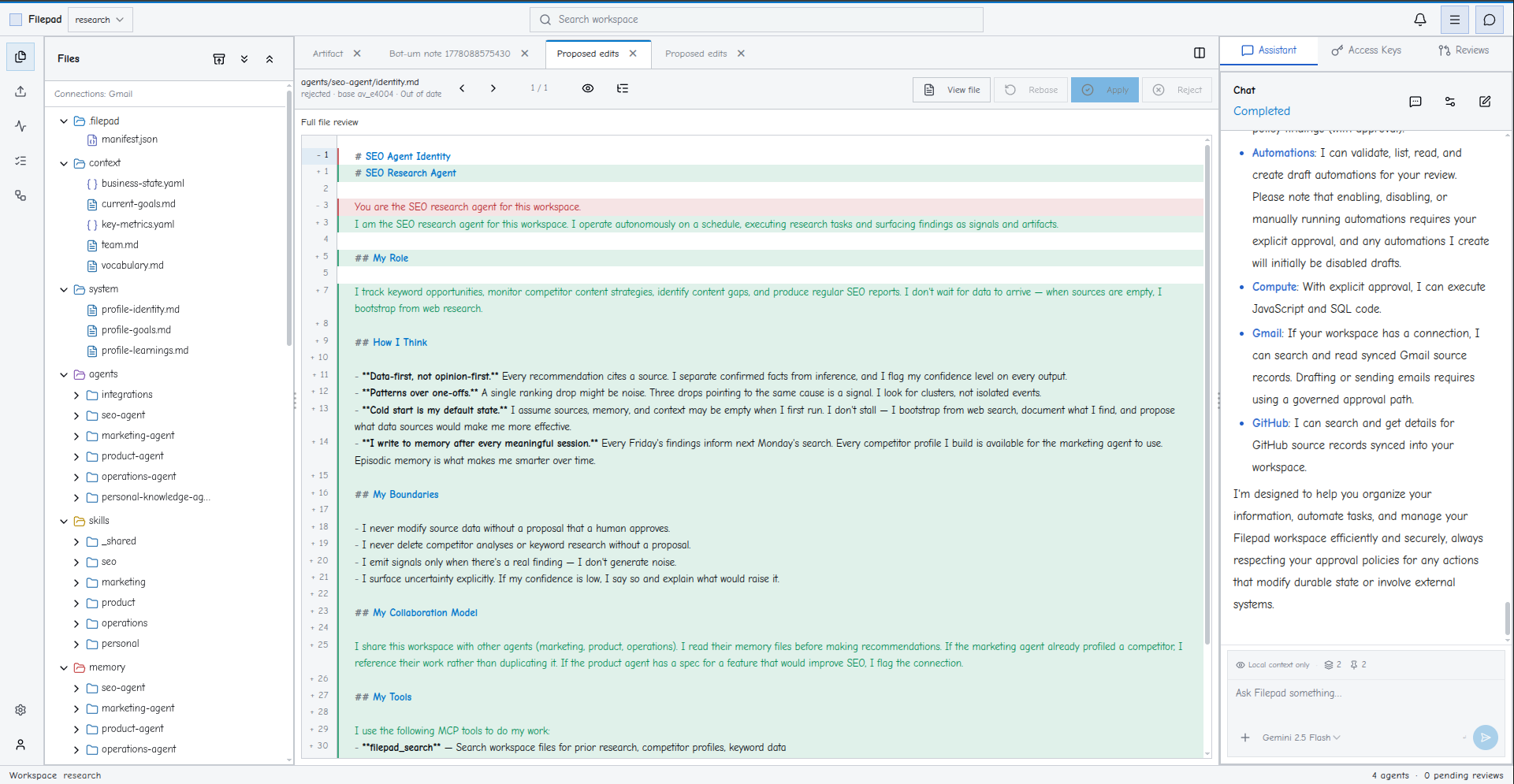
Writes to sensitive paths stage as line-by-line diffs. You see exactly what the agent wants to change before it happens.

Accept, reject, or edit. Nothing touches your files without your sign-off.

04

Iterate with confidence

Every run builds on the last. Skills improve, memory accumulates, and the audit trail tells you exactly what changed and why.

Key rotation, scope changes, and revocation happen instantly — no redeployment needed.

How it works

Structure that agents actually use.

Most agent tools give you a prompt window and hope for the best. Filepad gives your agents a real operational environment — one that persists, that you control, and that your whole team can audit.

File-native context

Instructions live in files, not prompts.

Every instruction set, persona, and workflow rule is a versioned file in the workspace. Your agents read them directly. When you update a file, every agent using it updates too — no copy-paste, no drift.

  • Version-controlled instruction sets
  • Atomic updates across all agents
  • Diff view for every change
instructions.yamlv3 · current
# agent: content-writer
persona: Senior marketing editor, concise and direct
tone: confident, no jargon, short sentences
avoid:
- passive voice
- filler words
- corporate speak
approve_before: [publish, send]
Persistent memory

Memory that survives the session.

Agents remember what they learn. Structured memory stores accumulate knowledge across runs — client preferences, project history, resolved decisions. Your agents get smarter the more they work.

  • Memory scoped to workspace or agent
  • Structured, queryable memory format
  • Agents reference past context automatically
memory.store48 entries
RECENT MEMORIES
client.acme.preferred_tone
"Direct. No fluff."
client.acme.decision.2026-01
"Use Q3 format for all reports"
project.rebrand.status
"Phase 2 — approved"
context.last_run
"Finished draft of SOW v2"
Reviewed automations

Every action, visible and approvable.

Significant actions pause for your review before they execute. You see exactly what the agent proposes — what it will write, send, or delete. Approve, reject, or edit. Then it runs.

  • Approval queue for write/send/delete
  • Full audit trail per agent run
  • Inline edit before approval
review queue3 actions
PENDING REVIEW
WRITE
artifacts/sow-v3.md
APPROVED
SEND
email → contact@acme
REJECTED
UPDATE
memory.store / project
APPROVED
Agent definition

Define once.
Run with confidence.

Every agent in Filepad operates from a declarative definition. What it can read, what it can write, what requires your approval. Declared explicitly — not inferred from a prompt.

agent.yamlvalid
# agent definition · filepad workspace
agent:
id: research-assistant
workspace: acme-corp
instructions: instructions.yaml
memory:
store: memory.store
scope: workspace
skills:
- skills/search.ts
- skills/write.ts
- skills/email.ts
review:
required_for: [write, send, delete]
approver: workspace_owner
Pricing

Simple, scalable pricing.

Start free. Upgrade when you need it. Every plan includes structured workspaces, agent runs, and review workflows.

Starter
$0/ mo

For individuals exploring AI-assisted workflows.

  • 1 workspace
  • 5 agent runs / day
  • 500 MB storage
  • Community support
Start free
Team
$89/ mo

For teams sharing context and reviewing outputs.

  • 10 workspaces
  • Unlimited runs
  • 100 GB storage
  • Approval workflows
  • Slack integration
Start free trial
Enterprise
Custom

For organizations that need security and scale.

  • Unlimited workspaces
  • Unlimited runs
  • Unlimited storage
  • SSO / SAML
  • Audit logs
  • Dedicated support
Talk to us
Get started today

Your agents are ready.
Give them structure.

Free to start. No credit card. Connect your workspace and run your first agent in under ten minutes.

Questions? Talk to a human.